Understanding the Context Window Setting
This article explains what the Context Window setting does and how to choose the right value when creating or editing a custom agent.
Written By Kristė Vagnerytė
Last updated 6 months ago
What Is the Context Window?
The context window controls how much information a custom agent can hold in a single conversation.
This includes:
Conversation history
Uploaded attachments
System prompt content
The larger the context window, the more the agent can reference within one session.
Where to Find This Setting
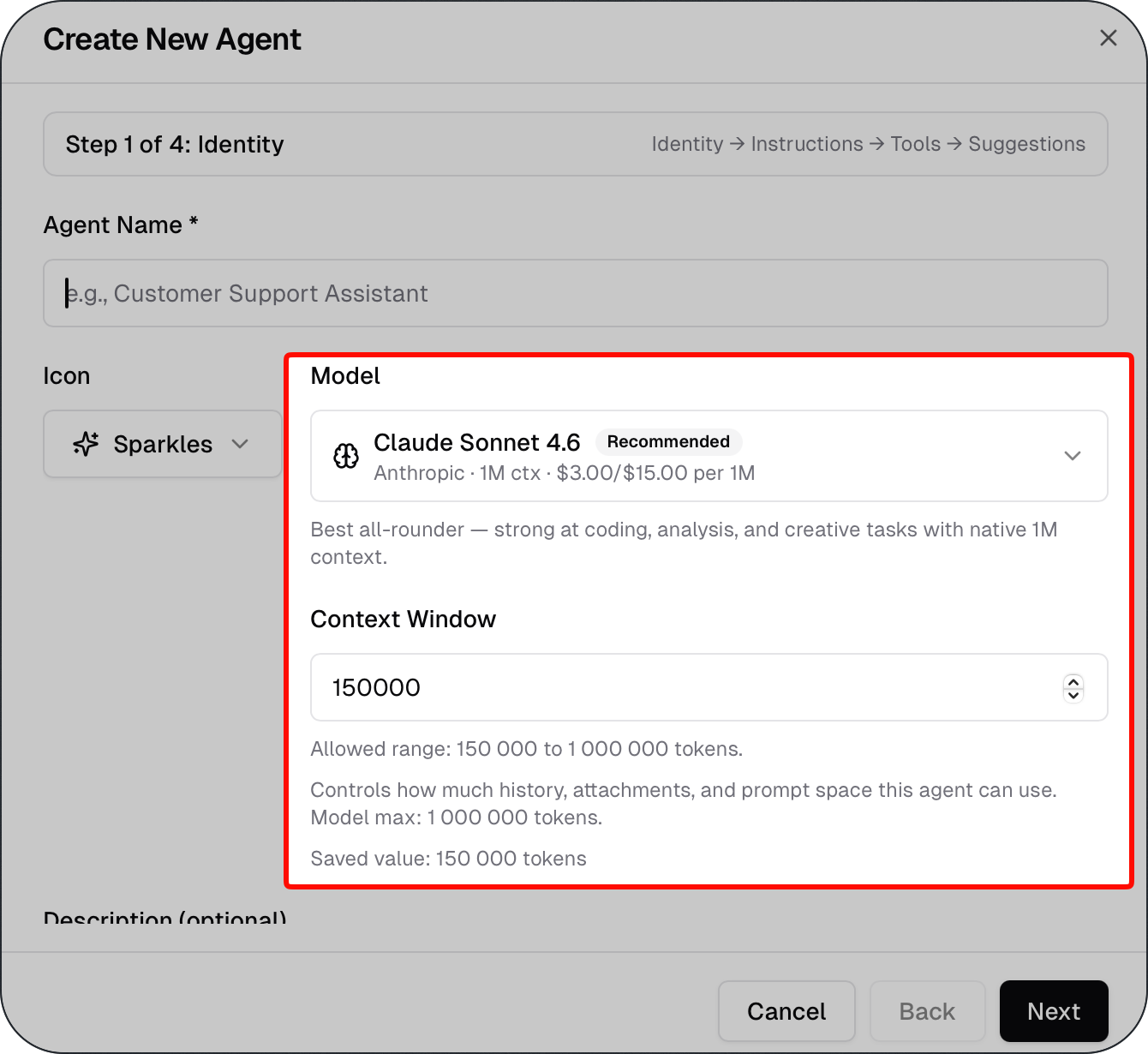
The Context Window field is located in the Identity tab when creating or editing a custom agent.
Allowed Range
The allowed range is 150,000 to 1,000,000 tokens.
The maximum value depends on the model selected for the agent:
How to Choose the Right Value
Use a larger context window when:
The agent handles long documents or attachments
Users are expected to have extended conversations
The agent needs to reference earlier parts of the conversation
Use a smaller context window when:
Tasks are short and focused
The selected model has a lower maximum (e.g. Claude Haiku 4.5)
Note: The context window setting does not affect usage cost. Cost is determined by the model selected for the agent.
Important Notes
The saved value is displayed below the input field after saving.
If you change the model, verify that the context window value still falls within the new model's allowed range.
What to Read Next
Was this helpful?
Still need help? Ask the team